Introducing Opportunities: find your next PR angle in RunPR
Plan around earnings, announcements and client milestones with RunPR Opportunities. Review relevant angles and move into drafting from one workspace.
An earnings call is coming up. A new report could give your client something useful to explain. A launch date is on the calendar, but the pitch is still a blank page.
The hard part isn't finding another headline. It's deciding whether your client has something worth adding and what to do next.
Opportunities is now part of the RunPR dashboard. It brings news research, selected upcoming events and your own client milestones into one place, connected to the pitch workflow your team already uses.
Say your client advises retailers on inventory planning. An upcoming earnings call at a company on your watchlist could be a reason to prepare questions and gather the client's own observations. Once results are published, you can assess whether there's a useful story about inventory or demand. That's an example of how to use the workspace, not a prediction about the results or a claim that every earnings call deserves a pitch.
Start with the client, not the feed
Select a client, then open Opportunities in the dashboard sidebar.
You can also start with What to pitch next on Today for a shorter list of ready and planning opportunities.
The workspace separates work by timing and progress: Act now, Plan ahead, Drafts started and Needs review. The default For you view brings together the ready and planning items. Search and type filters help you find a particular company, event or milestone.
Those distinctions matter. An upcoming event gives you time to prepare. A recent announcement may offer a response angle. An item with an unresolved source or client-fit question needs more work before it becomes a pitch.
Raw feed items stay separate under Unreviewed monitor stories. You can inspect a story, save it for review or check its source and client fit without treating every headline as a recommendation.
When you open an opportunity, you can inspect the proposed angle and the available source evidence. Official-event recommendations also show the client-profile passage behind the suggested contribution. A date on a calendar is treated as a scheduled event, not proof that something happened or that results are available.
Choose the companies and themes worth watching
In Manage coverage, workspace owners and admins can choose the selected client's official sources. Start with a relevant industry pack, then add or remove individual companies. Search the supported catalog by company name or ticker and expand a pack to see who's included. Choose Save coverage to apply your selections.
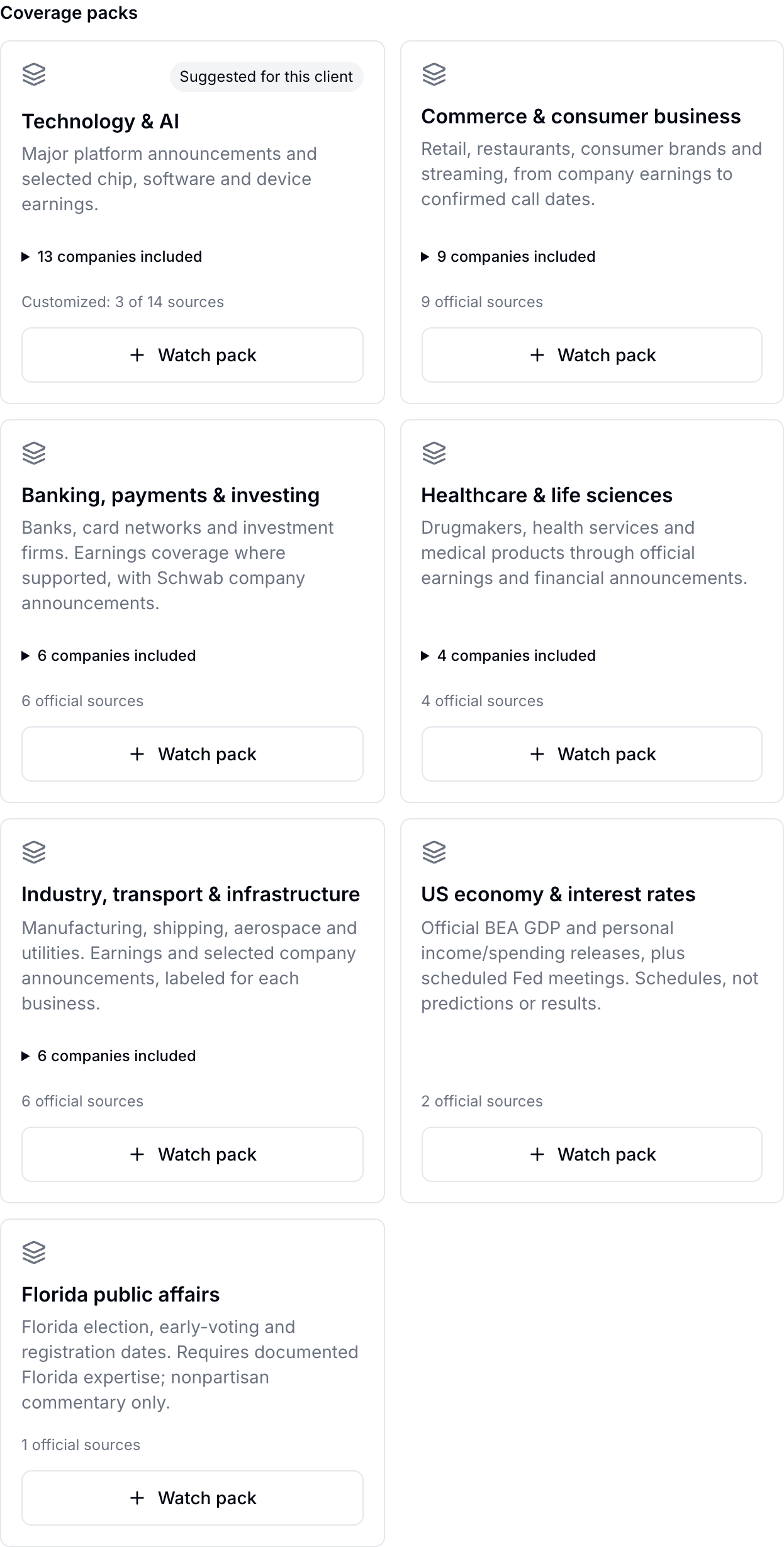
RunPR's coverage controls, captured September 28, 2026. Packs can be customized for each client.
The launch catalog includes 38 companies and 42 official sources across seven packs:
- Technology & AI
- Commerce & consumer business
- Banking, payments & investing
- Healthcare & life sciences
- Industry, transport & infrastructure
- US economy & interest rates
- Florida public affairs
The company packs combine selected announcements, earnings information and call schedules. Each company's listing explains what's covered: for example, Amazon and Netflix provide confirmed call schedules, not results coverage. The economy pack covers official BEA release and Federal Reserve meeting calendars. Florida public affairs covers selected election-related dates for clients with relevant, documented expertise.
These are curated sources, not complete stock-index coverage or a universal events calendar. News monitors and coverage packs do different jobs: monitors collect reporting to investigate, while the coverage watchlist follows selected official company and calendar sources.
Automatic research checks selected sources in rotating batches, within your research allowance. Larger watchlists can take about a day to cycle through when scheduled checks succeed. The workspace shows source-check status so you can distinguish a checked source from one still waiting for its turn. Owners and admins can pause automatic research without changing saved drafts.
Bring your own client milestones
Not every useful moment comes from someone else's news.
Use Add milestone to record a sourced client event, such as a publicly announced launch, research release or speaking appearance. Include a public source link, the passage supporting the event and date, how certain the date is and why the client's contribution matters. Confirm that you've checked the source before saving.
Those milestones sit alongside other opportunities and are labeled as client-provided. RunPR does not independently verify the information you enter.
Move from an angle to a draft
Open an opportunity, review its evidence and choose Prepare a draft when the item is ready. RunPR carries the opportunity into Create, where you explicitly generate the pitch using your normal drafting allowance.
If a draft is already linked, you can return to it instead of starting the same work again. Drafts started keeps those connections visible, while the Pitches page remains the place to review and manage the pitch itself.
Writing feedback and factual checks stay separate. Your team edits, reviews and approves the draft, then decides when to send it. Finding an opportunity never sends an email automatically.
Try it on one client
Open Opportunities, choose a client and set a small, relevant watchlist. Add a sourced milestone you already know is coming. Then inspect the evidence behind one possible angle before deciding whether to draft it.
New to RunPR? Start a free trial to explore the workflow.
The aim is a useful next move for that client: something to prepare, something to respond to or a story to leave alone.
Want a tighter PR workflow?
See how RunPR helps teams move from signal to drafted, approved and sent outreach.
Start free trial