Ask RunPR: Work through your next PR move in chat
A private-beta preview of using chat to understand your dashboard, review saved client work and prepare your next PR move.
Ask RunPR is in private beta. It is not generally available to RunPR customers yet.
A client asks what you should do next. You have a pitch queue, a few possible news hooks, and a visibility report. The information is there. You still need to work out which draft deserves attention, whether the news is timely, and what the numbers actually tell you.
That is the work I want Ask RunPR to make easier.
Ask RunPR puts a conversation inside your RunPR workspace. You choose an organization and client, then ask about their saved work, follow up on an answer, or ask it to help prepare a draft or report. You can start with the question you need answered without remembering which screen holds each part of the answer.
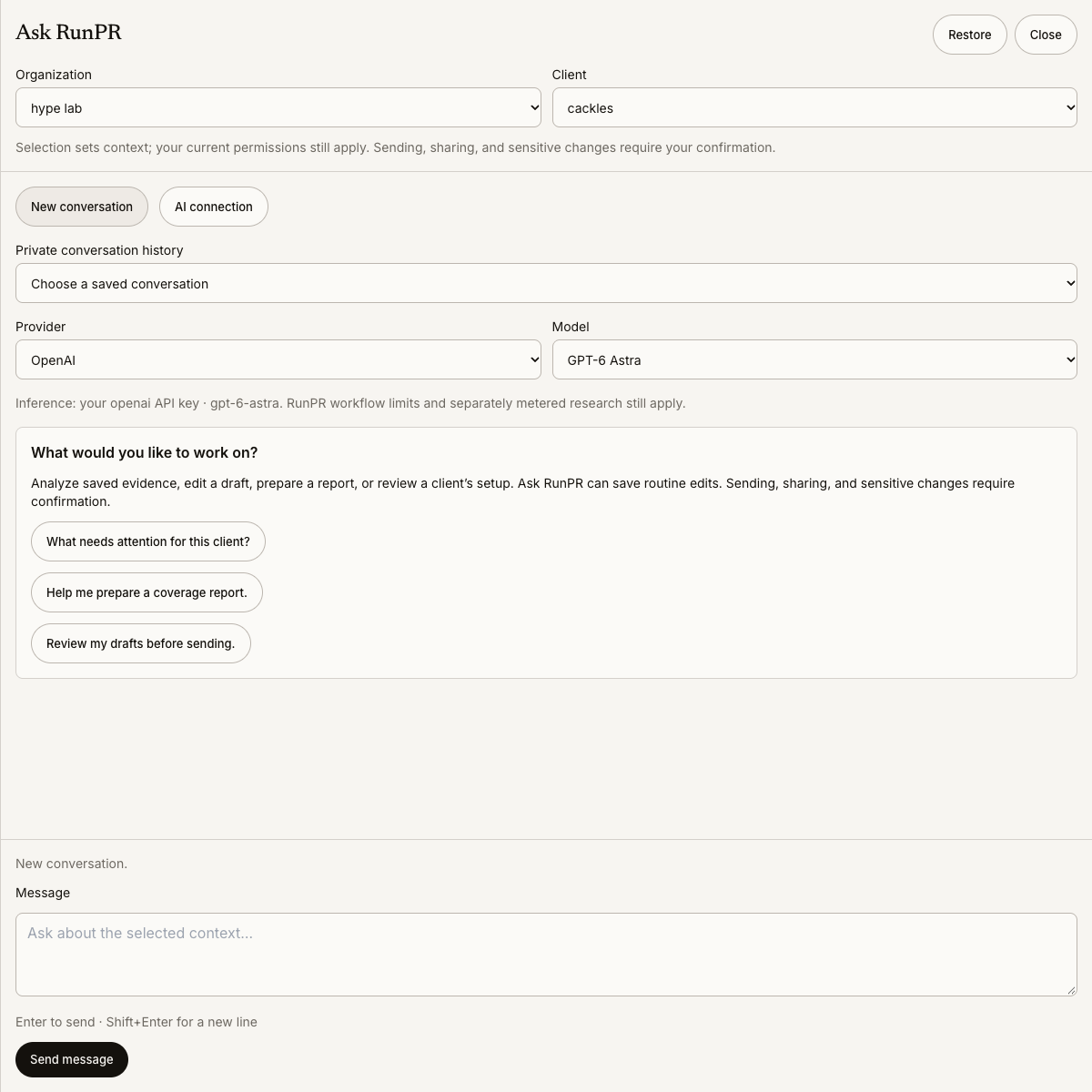
The actual private-beta interface. Selecting a client sets the conversation’s context; your existing permissions still apply.
A useful answer can mean doing less
In a saved private-beta conversation about Cackles, the question was: “What needs attention for this client?”
Ask RunPR recommended reviewing the pitch queue before creating more drafts. It pointed out overlapping angles in the records it had retrieved, drafts on hold, and news hooks that needed another look. It also distinguished “no client-linked replies returned” from “nobody replied.” Those are different statements, and treating them as the same thing could lead to the wrong follow-up.
The next step was concrete: inspect the newest drafts and the hold reasons, then choose a smaller, distinct shortlist for review. The answer did not send anything or start fresh research.
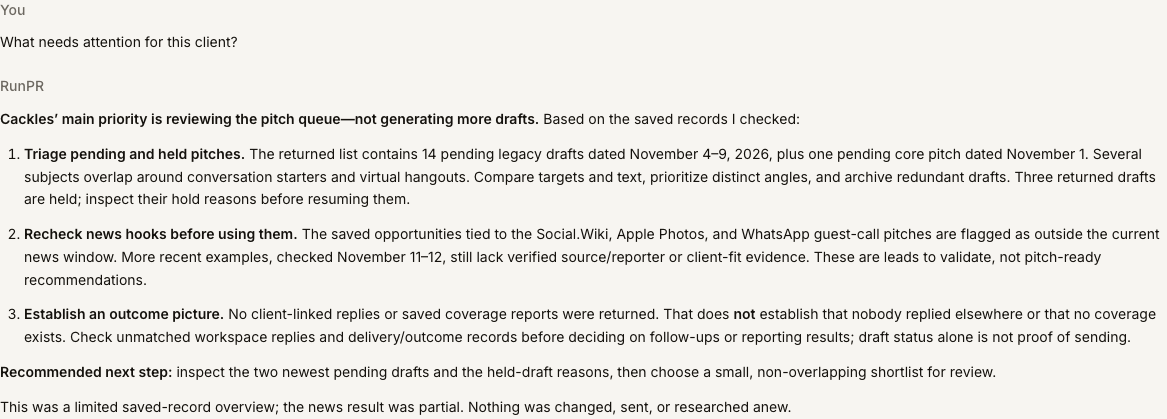
Actual saved private-beta answer, captured November 12, 2026. It describes a limited set of retrieved records, not a complete audit or a measured customer result.
That is a useful starting point for a conversation. You can ask what made an angle repetitive, what a held draft is missing, or which facts need checking before the team moves ahead. You still make the editorial judgment, with more of the relevant context in front of you.
Understand what the dashboard is telling you
Dashboards are good at keeping records visible. Interpreting those records often requires a second question.
An AI Visibility scan might show that a company appears in answers to questions naming the brand, but rarely appears when people ask about the problem it solves. Those results describe different kinds of visibility. A single overall percentage can obscure that distinction.
A useful request would be:
Explain this client’s latest completed visibility scan. Separate questions that name us from category-discovery questions. Include the scan date, the counts behind the percentages, and what the results cannot establish.
Then follow up:
Which saved answers should I inspect first, and what sources did those answers cite?
Ask RunPR can work with saved scans, answers, sources and supported comparisons. Reading them does not start a fresh scan. A mention is not a visit, a citation is not an endorsement, and neither proves that a PR campaign caused the result. The conversation should help you understand those limits as well as the numbers.
Four ways to use the conversation in everyday PR work
The prompts below are practical examples based on current private-beta capabilities. They are not customer testimonials or promises of a particular result.
Prepare for a client check-in
You have twenty minutes before a meeting and need to distinguish work in progress from results you can report.
Summarize this client’s saved pitch activity, linked replies and coverage evidence for October 2026. Keep drafts, sends and coverage separate. Flag missing evidence and give me three questions to resolve before the meeting. Read only; don’t change anything.
This gives you a starting brief to check against the original records. If replies have not been linked to the client or coverage has not been saved, Ask RunPR should say so rather than fill the gaps.
Review an existing pitch instead of starting over
A draft has a promising angle but a weak opening. Ask to inspect it first, then give a precise editing instruction:
Read this draft and suggest a shorter opening that makes the reporter’s relevance clear. Keep the quoted facts and source links unchanged. Show me the revision in chat before saving it.
After reviewing the suggestion, you can ask Ask RunPR to save the edit to the existing draft. Routine edits can be saved through chat, so “show me first” matters when you want to compare versions before making a change. Saving an edit is not approval or sending, and an edit can invalidate an earlier review.
Decide which upcoming event is worth preparing for
A calendar full of events is not a PR plan. You need a relevant event, a contribution the client can support, and enough time to prepare it.
Review this client’s saved upcoming-event recommendations. Which one has the clearest relevance to our expertise? Show the source and timing, then list the facts or spokesperson input we would need before drafting.
Ask RunPR can bring saved recommendations and their evidence into the discussion. If a source is outdated or relevance is weak, that should remain visible. Asking about saved opportunities does not mean a new research job has run.
Prepare a report with the right scope
“Make a coverage report” leaves several decisions unanswered: which client, which dates, who will read it, and whether to use saved evidence or discover new coverage.
In another saved Cackles conversation, Ask RunPR asked about the date range and audience, then explained the two paths: use existing records or request coverage discovery. Fresh discovery uses the existing plan allowance and needs confirmation before it starts.
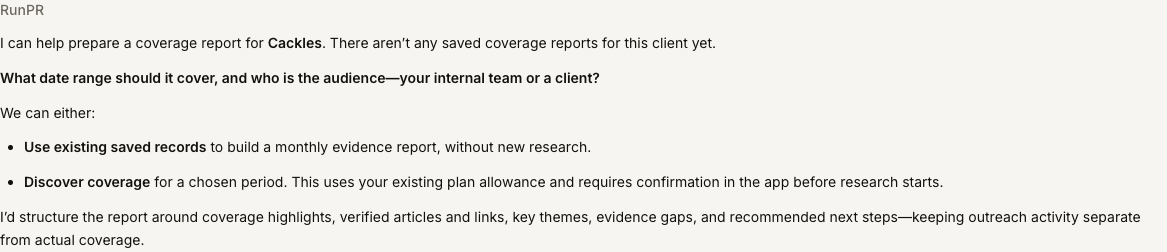
An actual saved response. The chat asks for scope and distinguishes saved evidence from new research.
For an internal review, a more useful starting request is:
Help me prepare an internal report for October 2026 using only this client’s saved coverage evidence. Flag gaps, keep outreach activity separate from coverage, and show me the proposed outline first.
You can then refine the outline, ask for a saved report, review its contents, and use RunPR’s supported reporting workflow. Preparing an internal report does not automatically publish it or email it to a client.
Know when you are asking and when you are changing something
Ask RunPR can do more than explain records. Within your permissions, it can save routine edits and prepare supported workflow actions. Be explicit when you only want analysis or a proposed change.
Sending email, public sharing, sensitive changes and metered operations such as new coverage discovery have confirmation steps. Review the exact action and its effect before confirming. Existing workspace permissions, sending protections and product allowances still apply.
The private beta uses your connected OpenAI or Anthropic API key for chat inference. Some drafting and review operations require Anthropic; other workflows, such as visibility scans, use RunPR’s existing services and allowances. Connecting a chat key does not make research unlimited or remove your plan limits. Relevant workspace information is sent to the selected model provider to answer the request, so your organization’s provider and data policies still matter.
What happens next
I’m testing Ask RunPR privately before opening it to more customers. The interface and supported workflows can change during that work, and it is not switched on for every account today.
If you would like to be considered as access expands, email me about Ask RunPR with one client workflow you would want to try. A real question from your work, such as understanding a visibility result or preparing a client check-in, is more useful to me than a list of features.
Want a tighter PR workflow?
See how RunPR helps teams move from signal to drafted, approved and sent outreach.
Start free trial